

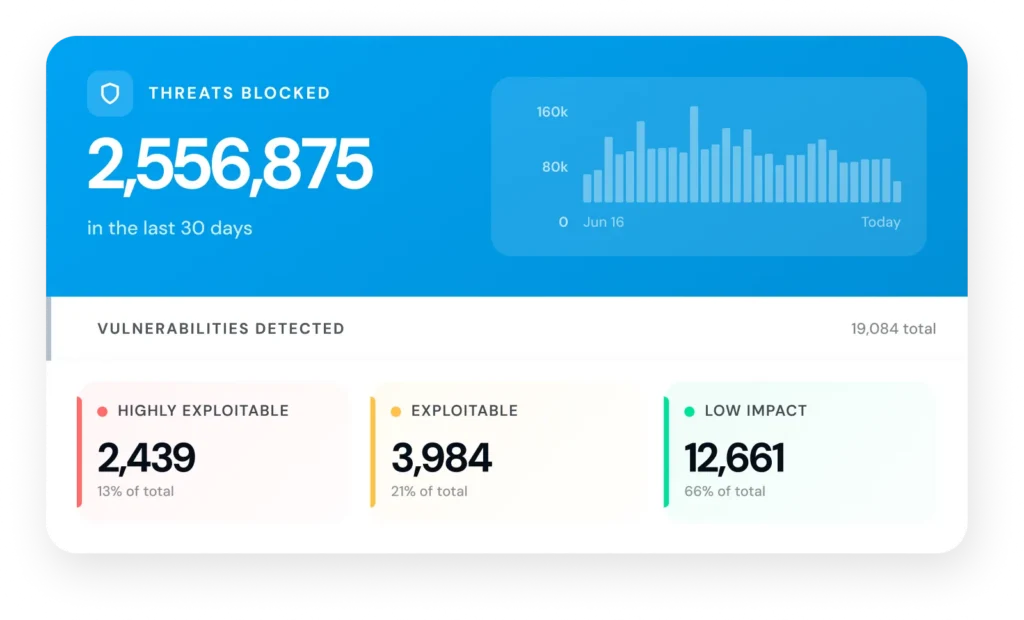
Last month, across the sites our users manage for their clients, we helped stop 2,556,875 attacks. Not a projection. Not a lab test. That is one month of real attacks, aimed at real client sites, stopped before anyone had to file a ticket.
That number carries more weight now, because WordPress.org changed how every plugin update reaches your sites, and the change opens a window on every site you manage at once.
Here is what happened, and what a month of portfolio-wide data actually shows about living inside that window.
Key Takeaways
- WordPress.org’s “Protect the Shire” policy holds every new plugin and theme release distributed through WordPress.org for up to 24 hours before it reaches sites (and WordPress has signaled that window will shrink over time!).
- For an agency, that delay does not hit one site. It hits every client running the affected plugin, on the same day, with the same exposure.
- Across our protected portfolio last month, we shielded client sites against 2,556,875 attacks and tracked 18,738 known vulnerabilities, 2,376 of them flagged highly exploitable.
- The value for an agency is not just protection. It is seeing your whole portfolio’s exposure in one view, and handing clients a record of what you kept out.
What actually changed with WordPress updates?
On June 5, 2026, WordPress.org launched an initiative called Protect the Shire that holds every new plugin and theme release for up to 24 hours before the update system distributes it. During that hold, automated scanners and reviewers check the code for malicious payloads before it ships to millions of installs.
The intent is genuinely good, and worth saying so plainly. Supply-chain attacks are real and getting worse. WordPress points to its own “Essential Plugins” incident, where a batch of trusted plugins was quietly sold to a bad actor and turned malicious. Reviewing code before it reaches the whole ecosystem is a defensible, arguably overdue move, so we are not here to dunk on the policy. It solves a real problem. It also creates a new one, and if you manage sites for a living, that one is yours.
Why does this hit agencies harder than single-site owners?
Because you are not carrying one exposure window. You are carrying all of them at once.
A hobbyist with one site sits inside a 24-hour gap on the rare occasion a plugin they run gets a security release. You run that gauntlet every day, multiplied by every plugin across every client. When a popular plugin like a form builder or a page builder discloses a vulnerability, it is not one of your sites exposed for a day. It is every client running that plugin, all exposed on the same day, all waiting on the same delayed update. The math that is an annoyance for one site owner is a portfolio-wide event for you.
That’s the part the general security coverage misses. The policy didn’t just add a day of risk. It synchronized that risk across your entire book of business. That’s a portfolio problem now, whether you signed up for it or not.
What does a month of protection actually look like across a portfolio?
It looks like a steady drumbeat, not the occasional scare. This is the part we can show rather than argue, because it comes straight from our own dashboard rather than a survey.
In a single month across the sites our users manage, we helped stop 2,556,875 attacks. That was a daily stream, not one dramatic spike, which tells you exploitation is constant background weather, not a rare storm you can schedule around. Over the same window we tracked 18,738 known vulnerabilities moving through the WordPress ecosystem, 2,376 of them flagged as highly exploitable. Those aren’t abstract CVE counts. Every one is a live risk that could be sitting on a client’s site right now.
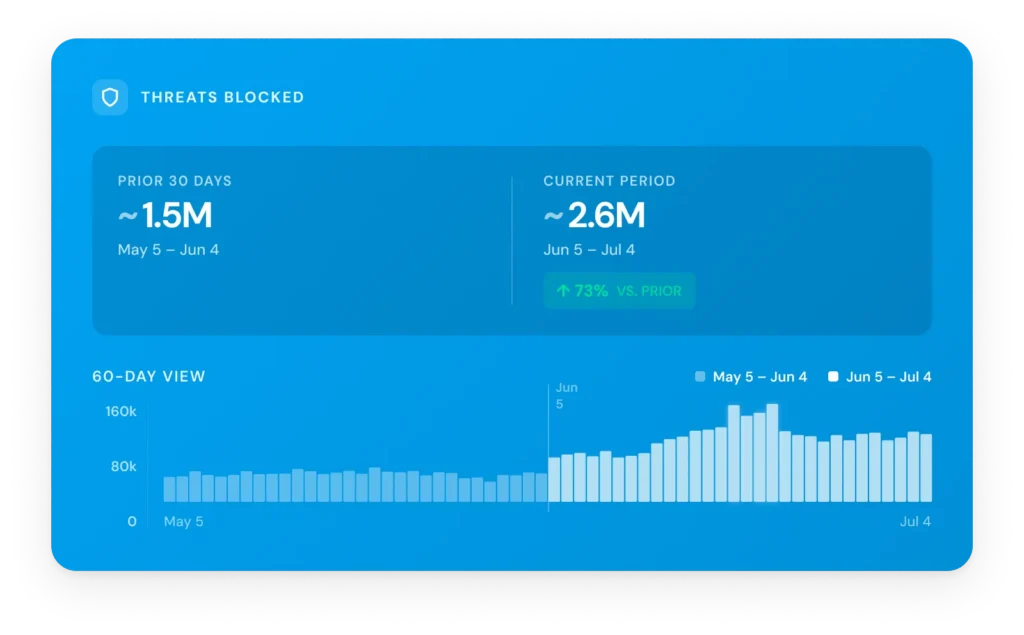
For an agency, numbers like these are the difference between guessing and knowing. You are not wondering whether your portfolio is under attack during the update window. You are watching the count of stopped attacks climb in real time.
How do you actually cover the window?
You stop leaning on the update mechanism as your only defense, because during the blackout window it is a layer that is switched off, and something has to hold in the meantime. Some of what holds costs you nothing.
Keep monitoring active regardless of update status. Map which client sites update outside the WordPress.org channel, since premium plugins and some managed hosts are not subject to the delay. Lean on staging when a critical vulnerability is disclosed. These are sound habits whether or not you add anything to your stack, and we lay out the full evergreen playbook in what you can do about plugin vulnerabilities .
Beyond that, application-level protection covers the window that updates leave open, by shielding a site before a fix is available rather than after. The point for this post is not the mechanism. It is that on a portfolio, you need that protection applied and visible everywhere at once, not switched on site by site while the clock runs.
Why the dashboard view is the part that matters for agencies
Protection you can’t see across your whole portfolio is protection you can’t manage. Vulnerability Protection in ManageWP isn’t a per-site toggle you babysit. You see every client site’s exposure in one dashboard and protect the whole portfolio without logging into each site one by one.
That matters most on exactly the kind of day this policy creates. When a popular plugin discloses a vulnerability and every client running it enters the same 24-hour window at once, you’re not triaging fifty logins while the clock runs. You’re looking at your whole portfolio’s exposure in one place and acting on all of it together. During a window that hits every site at the same time, that single-pane view is the difference between a calm morning and a frantic one.
Turning a policy change into a client conversation
This is a legitimate operational update your clients deserve to hear about, so frame it as exactly that, not a promotion. The policy is public, the risk is real, and telling a client you kept their sites protected through the window WordPress now leaves open is a message worth sending. It also happens to be true, which is more than most security marketing can say.
The takeaway for anyone managing client sites is simple. WordPress got safer against supply-chain attacks and, for 24 hours at a stretch, slower to defend against known exploits. Protect that window across your whole portfolio, show clients the proof, and a confusing policy change becomes one more reason they keep paying you to manage their sites.
Close the gap.
Frequently Asked Questions
Does the WordPress 24-hour delay affect security patches?
Yes. The Protect the Shire policy holds every plugin and theme release distributed through WordPress.org, including security fixes, for up to 24 hours. It is said the window is temporary and may shrink over time, but for now a fix can wait up to a day to reach sites on the standard update path.
Why does the delay matter more for an agency than a single site?
Because the exposure is portfolio-wide. When a widely used plugin discloses a vulnerability, every client site running it enters the same 24-hour window on the same day. A one-site owner faces that gap occasionally, while an agency faces it constantly and across many sites at once, which makes portfolio-level protection and visibility essential.
How much do you actually protect against in practice?
Across the sites our users manage, we helped stop 2,556,875 attacks in a single month. The volume is steady rather than occasional, which reflects how constant automated exploitation has become.
Do I need to change anything on my clients’ sites?
No. Vulnerability Protection works without code changes or manual steps on each site, and it’s managed across your portfolio from the ManageWP dashboard rather than site by site. Once enabled, protection applies automatically across every site you’ve switched it on for.
Image credit: Unsplash.

Leave a Reply